The security warning system at Hitclub acts as an automated shield, detecting abnormal access early and preventing risks to account safety. However, no matter how robust the security technology is, the decisive factor in asset protection remains the player’s proactive actions. Understanding common security warning scenarios at Hitclub helps you distinguish real notifications from fake ones and know exactly what to do when your account shows signs of unauthorized access.
Immediate actions upon receiving a security warning at Hitclub
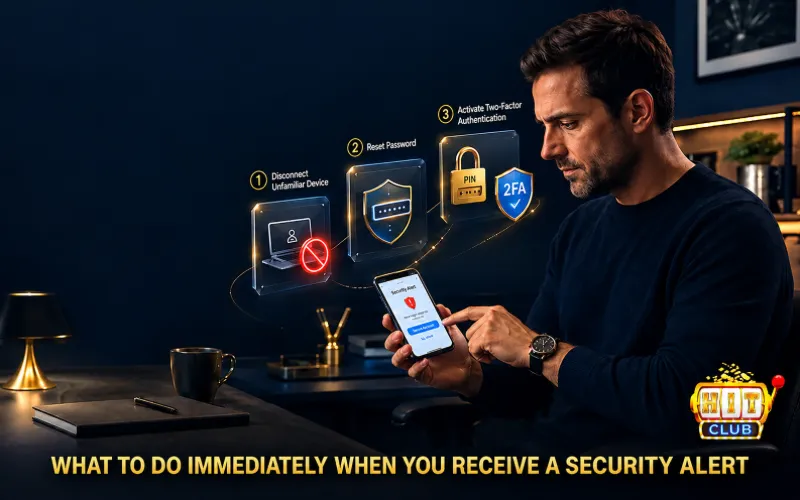
If you receive an SMS OTP, an email alerting you to an unfamiliar login, or an in-app notification indicating a temporary transaction lock, immediately follow these 3 steps:
Step 1: Disconnect and log out unfamiliar devices
- Go to Account Settings > select Login History.
- If you notice an IP address or device name that does not belong to you, click Log Out of All Other Devices.
Step 2: Change to a high-level password
- Perform a [Hitclub password change] immediately.
- Safe password rules: Minimum length of 8 characters, combining uppercase letters, lowercase letters, numbers, and special characters (for example: H1tclub#2026).
- Note: Do not use passwords that match your email, social media, or other gaming portals.
Step 3: Change withdrawal pin & enable 2fa verification
- Double-check your withdrawal PIN. If you suspect your information has been exposed, set a new PIN code.
- Activate the [2FA verification process] via Telegram or SMS immediately to require verification whenever an unfamiliar device is detected.
Recognizing common phishing & fraud schemes
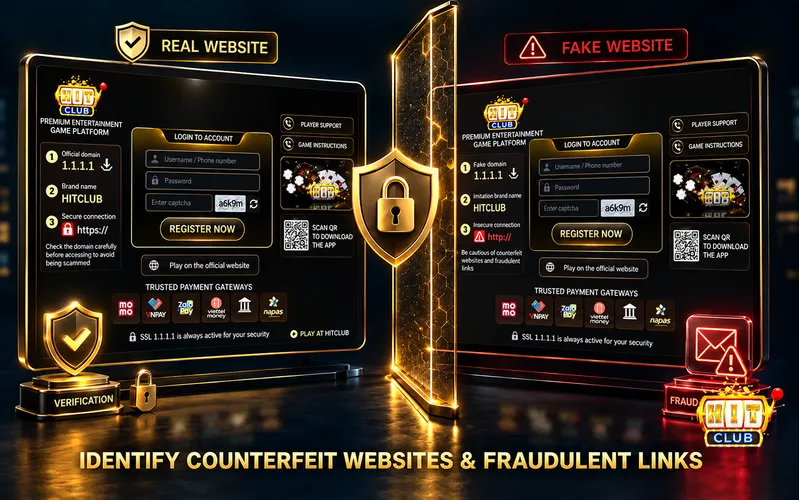
Most account loss incidents do not stem from system errors, but rather from users falling into Phishing traps. Below are 3 common scenarios to watch out for:
Phishing domains (Spoofed Websites)
According to the latest updates, malicious actors are creating websites with domain names closely resembling Hitclub (differing by only one or two characters) and copying the entire login interface to harvest your account usernames and passwords.
- Warning signs: Unusual URL paths, lack of an SSL security certificate (the padlock icon on the address bar), blurry images, or abnormal page loading speeds.
- Prevention: Only log in via the official app or bookmark verified official links.
Impersonating support staff requesting otp/password
Scammers proactively message via Zalo, Telegram, or call claiming to be “Customer Support” or “Security Technicians,” informing you that your account is locked and asking for your OTP code to resolve it.
Golden rule: The official support team NEVER asks players to provide login passwords, withdrawal passwords, or OTP codes under any circumstances.
Installing unverified apps containing malware
Certain spam links entice players to download “Hack tools,” “Prediction software,” or APK files of unknown origin. These apps contain malware designed to automatically read SMS messages and steal OTP codes from your phone.
Technical monitoring mechanism & automated incident handling

To ensure a transparent environment, Hitclub’s technical system operates real-time automated monitoring mechanisms:
[Abnormal access/activity detected]
│
▼
[Automated Risk Flag triggered]
│
▼
┌───────────────────────────────┴───────────────────────────────┐
│ │
▼ ▼
[Temporarily freeze withdrawal feature] [Send Security Warning notification]
│ │
└───────────────────────────────┬───────────────────────────────┘
│
▼
[Require account verification (2FA/CSKH)]
- Device Fingerprinting: When an account logs in from an entirely new device at an unusual geographical location, the system automatically requests an OTP verification code sent to the registered phone number.
- Automatic Protection Triggered Upon Withdrawal: If a password change and a withdrawal request occur too close together, the withdrawal feature is temporarily suspended for a specified duration to prevent potential account takeover.
>>See more: Applying Provably Fair Technology At Hitclub
Official Incident Reporting Channels
When discovering account intrusions or unusual transactions that cannot be resolved independently, you should immediately [contact Hitclub Customer Service] through the following official channels:
| Kênh liên hệ | Thời gian phản hồi | Trường hợp sử dụng |
| Live Chat (Trực tuyến) | Tức thì (24/7) | Khóa tài khoản khẩn cấp, báo cáo mất OTP. |
| Hotline Chăm sóc khách hàng | 1 – 3 phút | Xác minh thông tin chính chủ, xử lý sự cố đăng nhập. |
| Channel Telegram Chính Thức | 5 – 15 phút | Cập nhật thông tin đường link mới, báo cáo trang web giả mạo. |
Expert Advice: Proactively link your primary phone number and enable two-factor authentication right after creating an account. Initial risk prevention is always much easier and safer than handling incidents after your experience has been disrupted.